The product

Your enquiry workflow on the web and on iPhone

Explore the enquiry records, briefs and settings presented by Lorne & Vale. The functions available for your pilot are confirmed in writing.

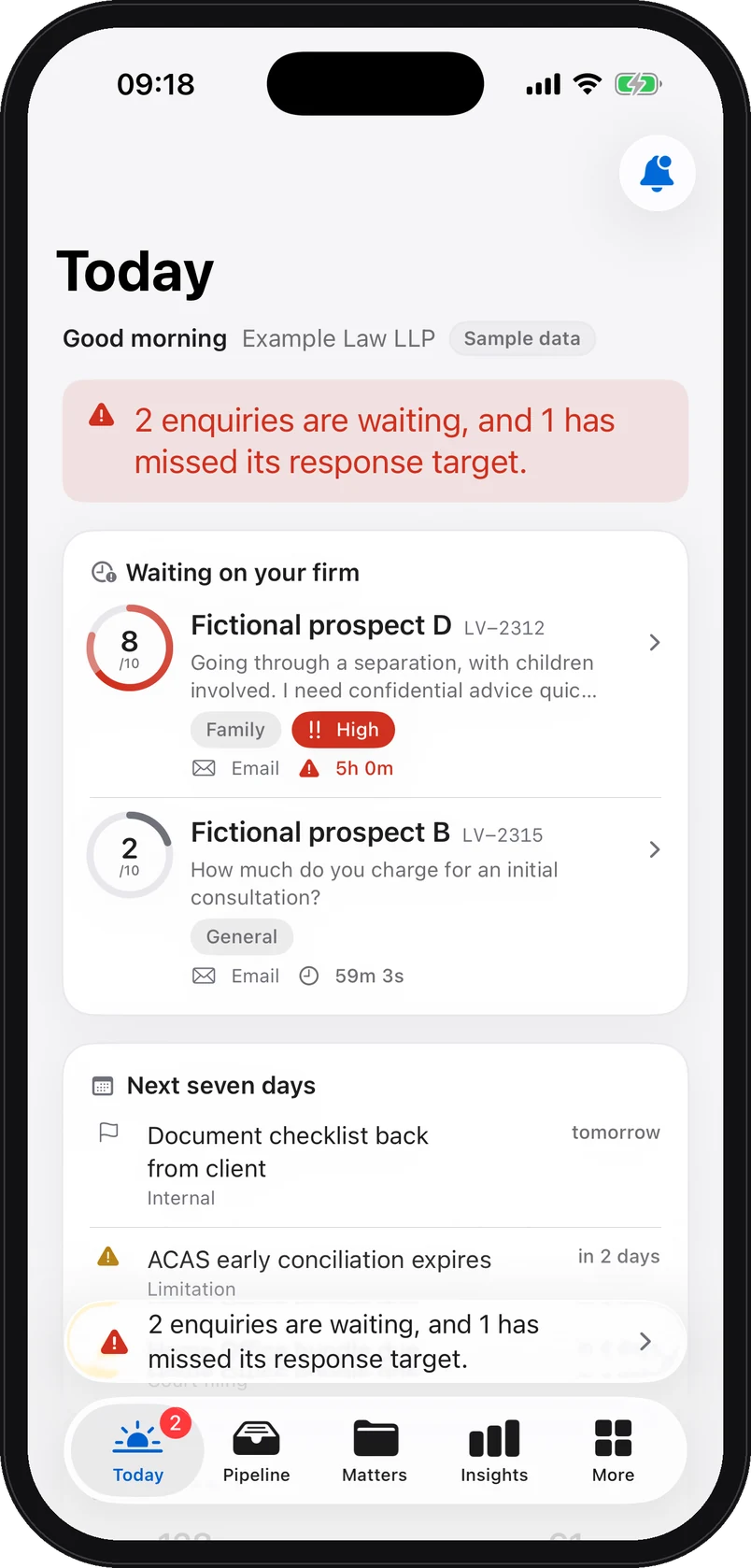
iPhone app screenshot with demo data: Today screen: two enquiries waiting on the firm, the first scored 8 out of 10 with its countdown, then the next seven days. The people are fictional.

Web platform view and iPhone app screenshots. All demo data is fictional.

The journey of one enquiry

The journey of a fictional enquiry

An example of receipt, triage and follow-up on the web and on iPhone. The times illustrate the sequence.

  1. Email

    Received

    An email lands on the firm’s contact address. The forwarding rule brings it into the circuit, exactly like a website form or a transcribed missed call.

    Charlotte Bennettcharlotte.bennett@example.invalid
    Separation, two childrenHello, I am separating from my husband. We have two children and things are getting tense. I need confidential advice quickly. Could you call me back?
    Direct email · contact addressForwarded into the circuit
    Fictional person, address reserved for examples.
  2. Platform

    Structured

    The enquiry becomes a enquiry brief: summary, practice area, score out of 10 and its rationale, urgency, parties to check, missing information. Identifiers are replaced by tokens before the model call.

  3. Platform

    Routed

    The enquiry enters the board, in the New column, routed to the partner for family law with a priority and a response target. A P1 priority sets a first response within 4 hours. Whatever runs past its target surfaces on its own.

  4. Email

    Acknowledgement sent

    An acknowledgement is sent automatically in the firm’s name. You approve its wording at setup. It confirms receipt only and does not confirm acceptance of the matter.

    Example Law LLPto charlotte.bennett@example.invalid
    We have received your enquiryHello, your enquiry has been received. Our team must review it before confirming whether the firm can act for you. This automatic message does not provide legal advice.
    Example wording, approved at setupSent in the firm’s name
    Fictional firm, wording given as an example.
  5. iPhone

    Visible on the iPhone

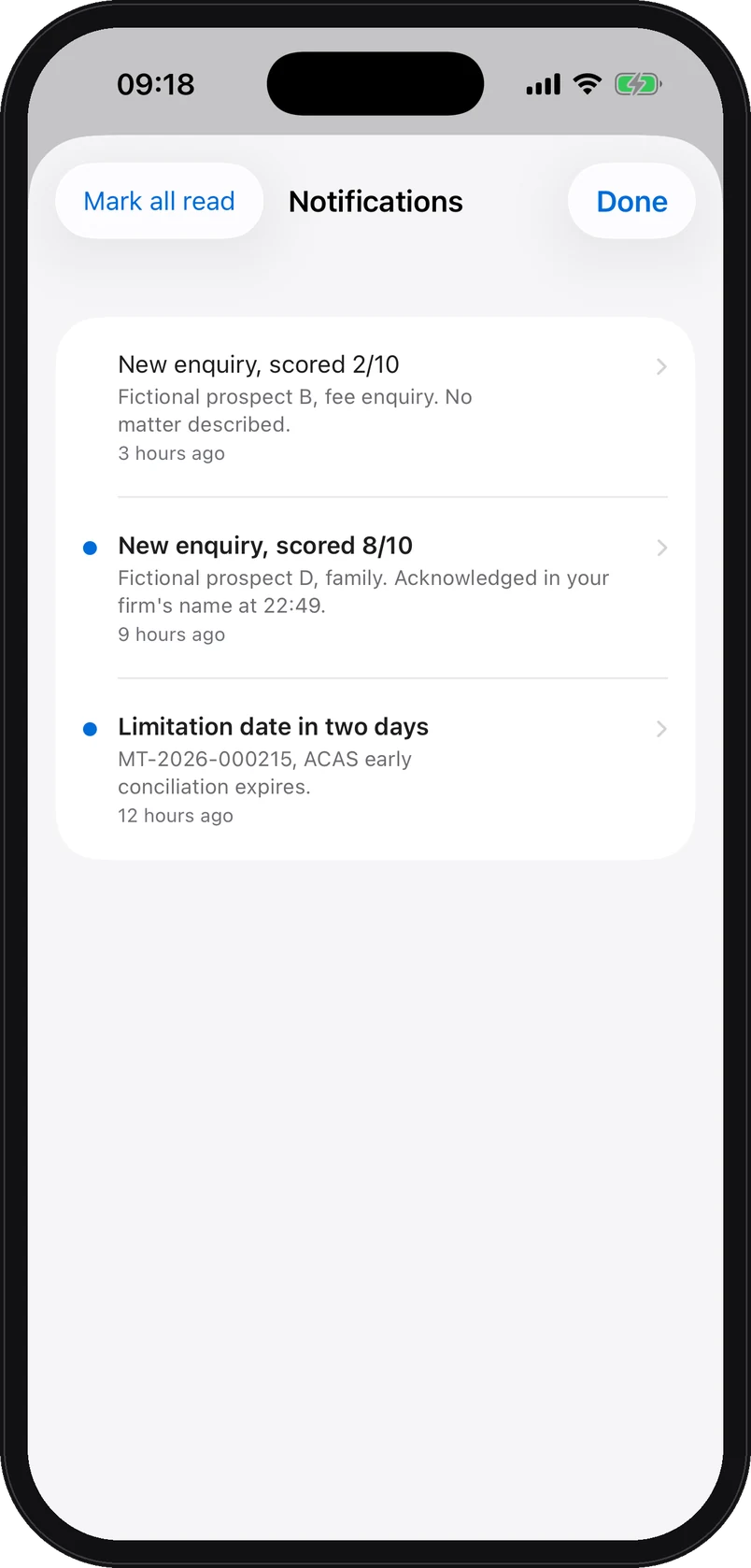
    The partner opens the app: the enquiry is there, scored 8/10, with its countdown. The notification list records the new enquiry and the acknowledgement sent in the firm’s name.

    iPhone app screenshot with demo data: The iPhone app’s notifications: a new enquiry scored 8 out of 10 in family law for a fictional prospect, acknowledged in the firm’s name at 22:49, and a limitation date falling in two days.
  6. iPhone

    A reminder before the target

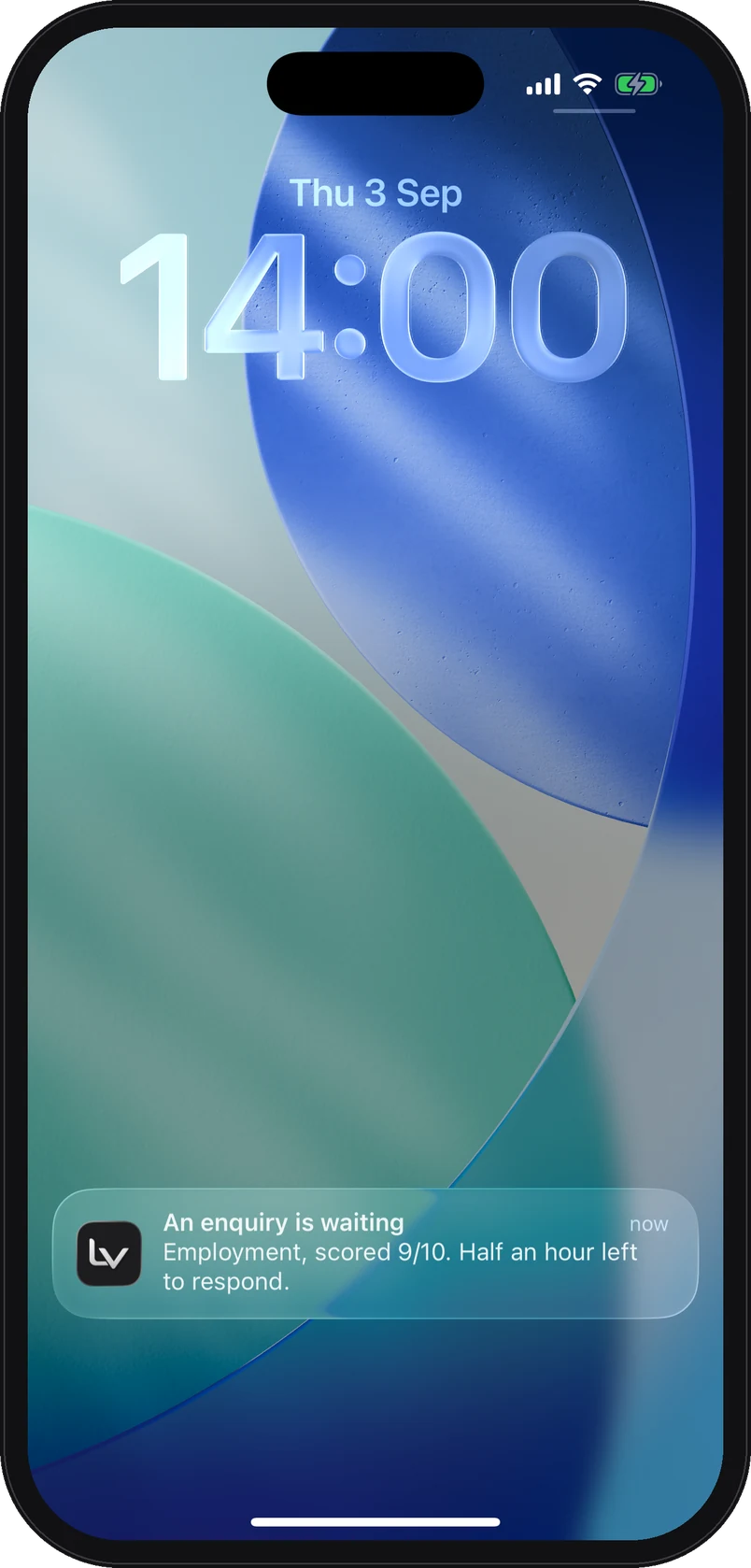
    The app can schedule an on-device reminder before a response target. The example notification shows the practice area and score without the person’s name.

    iPhone app screenshot with demo data: A reminder on the iPhone lock screen: an enquiry is waiting, employment, scored 9 out of 10, half an hour left to respond.

Web platform view and iPhone app screenshots. All demo data is fictional.

Enquiries

Connected enquiries in one board

Each enquiry arrives triaged and scored. You follow it as a list or as a board, from new to won.

  • Five readable stages: new, qualified, consultation, proposal, won. Every enquiry carries its qualification level, high, medium or low.
  • “Start here”: the band at the top of the page names the enquiry to handle first. Replies that are late are flagged, never buried.
  • Filters by stage, qualification level and practice area, your enquiries or the team’s, and a CSV export at any time.
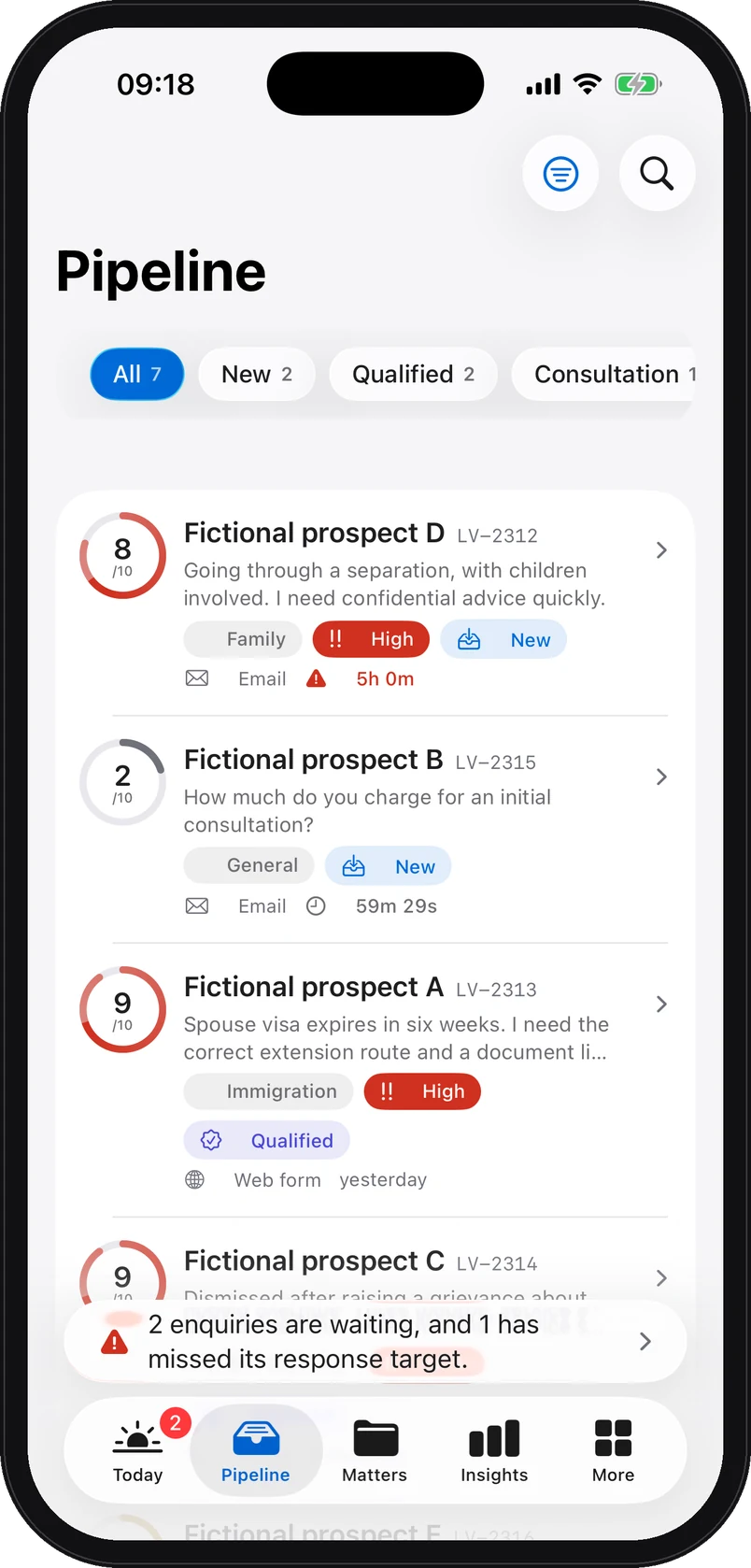
iPhone app screenshot with demo data: The enquiries on iPhone, Pipeline tab: each fictional enquiry with its score, practice area, stage and response time.
The enquiry brief

What the lawyer reads before deciding

Consistent fields structure each enquiry. A lawyer checks the information before deciding what happens next.

  • Summary of the situation in two sentences
  • Practice area and sub-area
  • Score out of 10 and its rationale in plain words
  • Urgency and qualification level, high, medium, low
  • Priority P1, P2, P3 and first-response target: 4 h, 24 h, 48 h
  • Recommended next step and suggested first contact
  • Watch points, flagged as needing attention
  • Missing information and documents to request
  • Counterparties and parties to check for the conflict search
  • Commercial value signals and intake quality
  • Suggested reply and suggested tone, as a draft
  • History of the enquiry, append-only

The list of parties is extracted by the model and requires a human check. The draft reply can be edited or discarded; the lawyer marks the first response as sent. The person’s identifiers are replaced by tokens before any model call, and names are restored only inside your firm’s database.

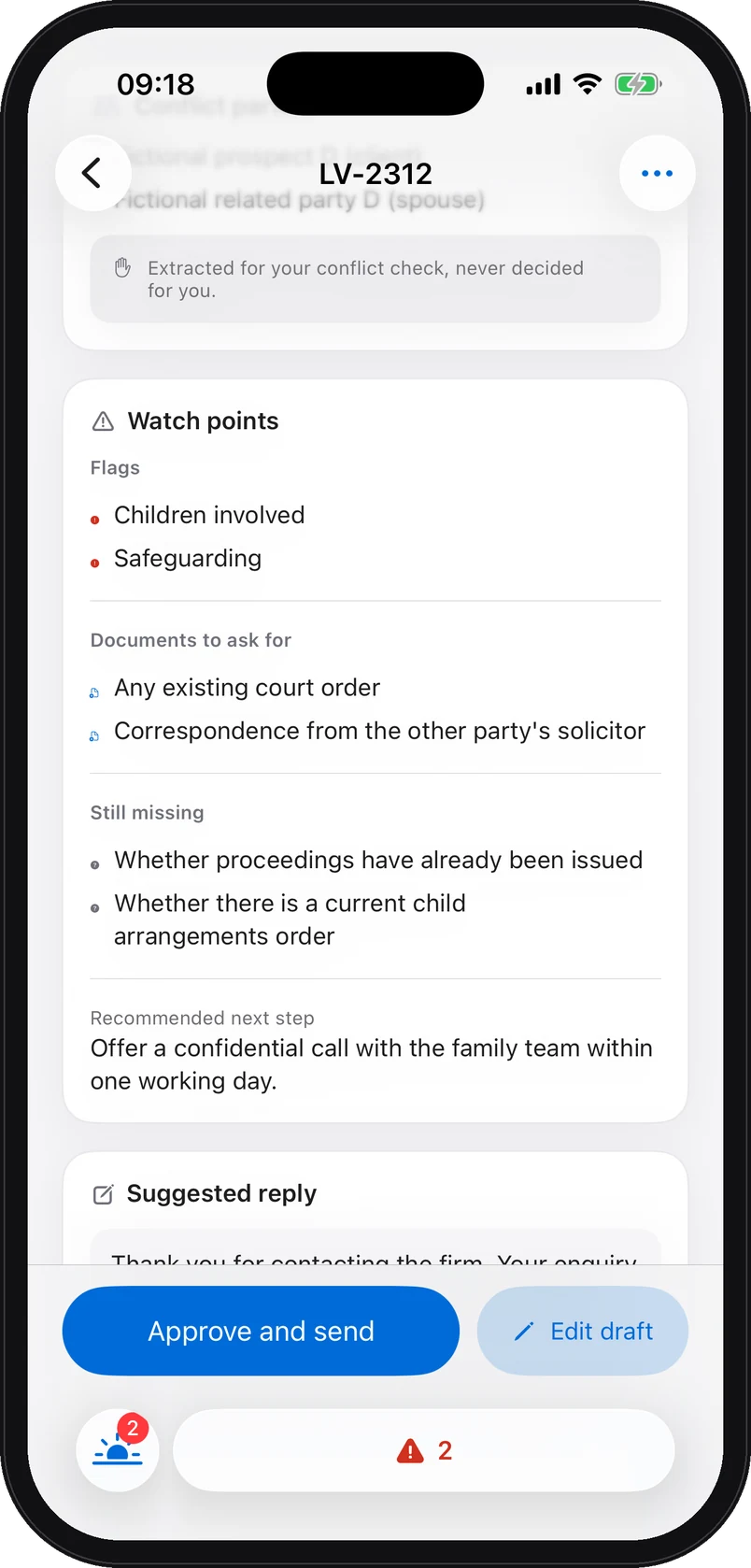
iPhone app screenshot with demo data: The enquiry brief on iPhone: watch points, documents to ask for, missing information, recommended next step and suggested reply.
Matters

The accepted matter carries on in the same place

Once a lawyer accepts the matter, the enquiry, documents and history can be linked to its record, subject to the functions included in your plan.

  • Deadlines and hearings, dated, with the next ones to watch at the top of the list.
  • Tasks, assigned team, documents and client portal, together on the matter’s own page.
  • An append-only history. Every step is recorded. Corrections add a new entry. Retention and deletion follow the applicable schedule.
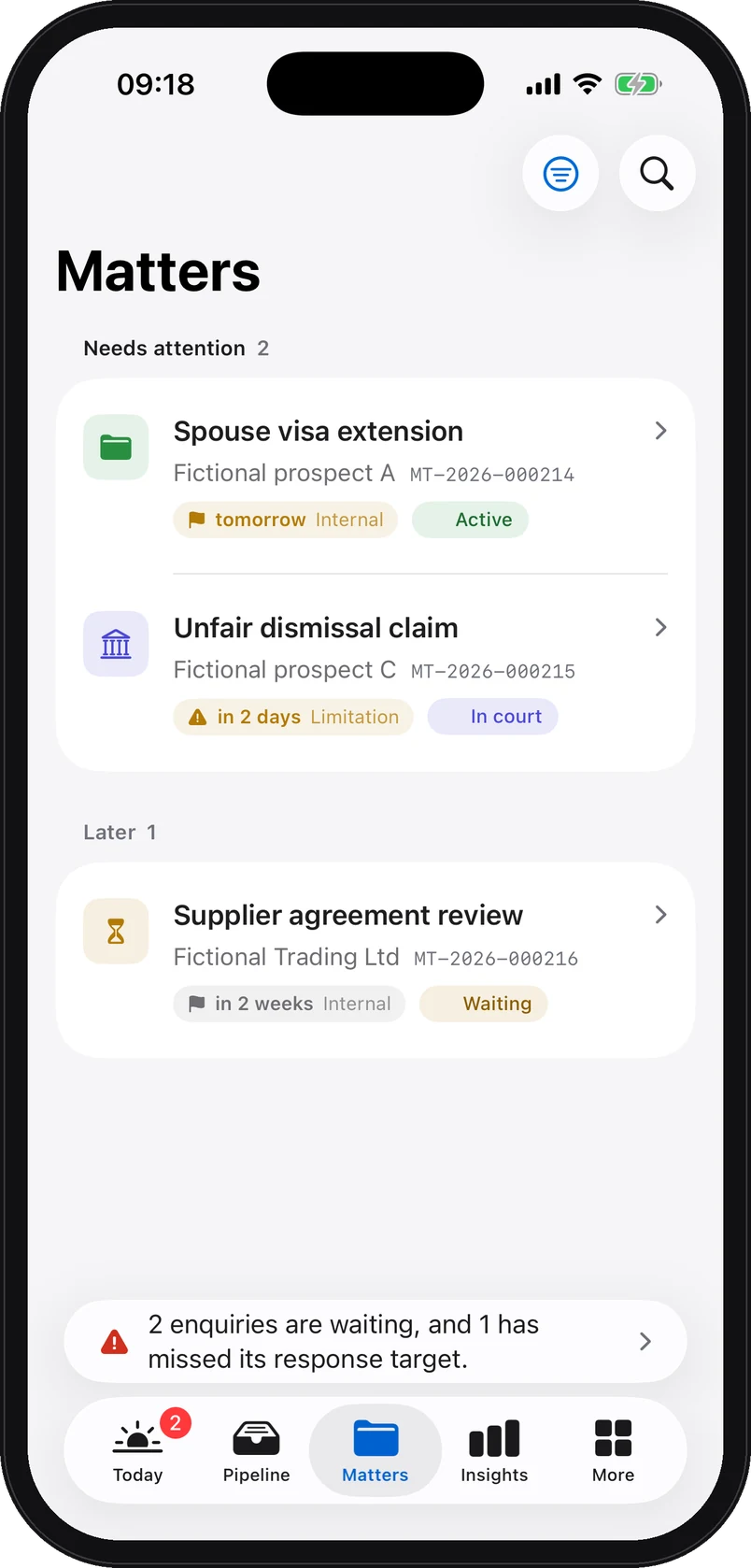
iPhone app screenshot with demo data: The matters on iPhone: two matters needing attention with their next deadline, and one matter for later. The people are fictional.
Reports

A weekly report for your partners

One page a week, as a PDF in the firm’s branding or a CSV for your own spreadsheets.

  • Enquiries received, hot, responded and average response time, compared with the previous week.
  • By practice area and by channel, with the enquiries broken down by stage.
  • Out-of-hours enquiries captured and the share of first responses within target.
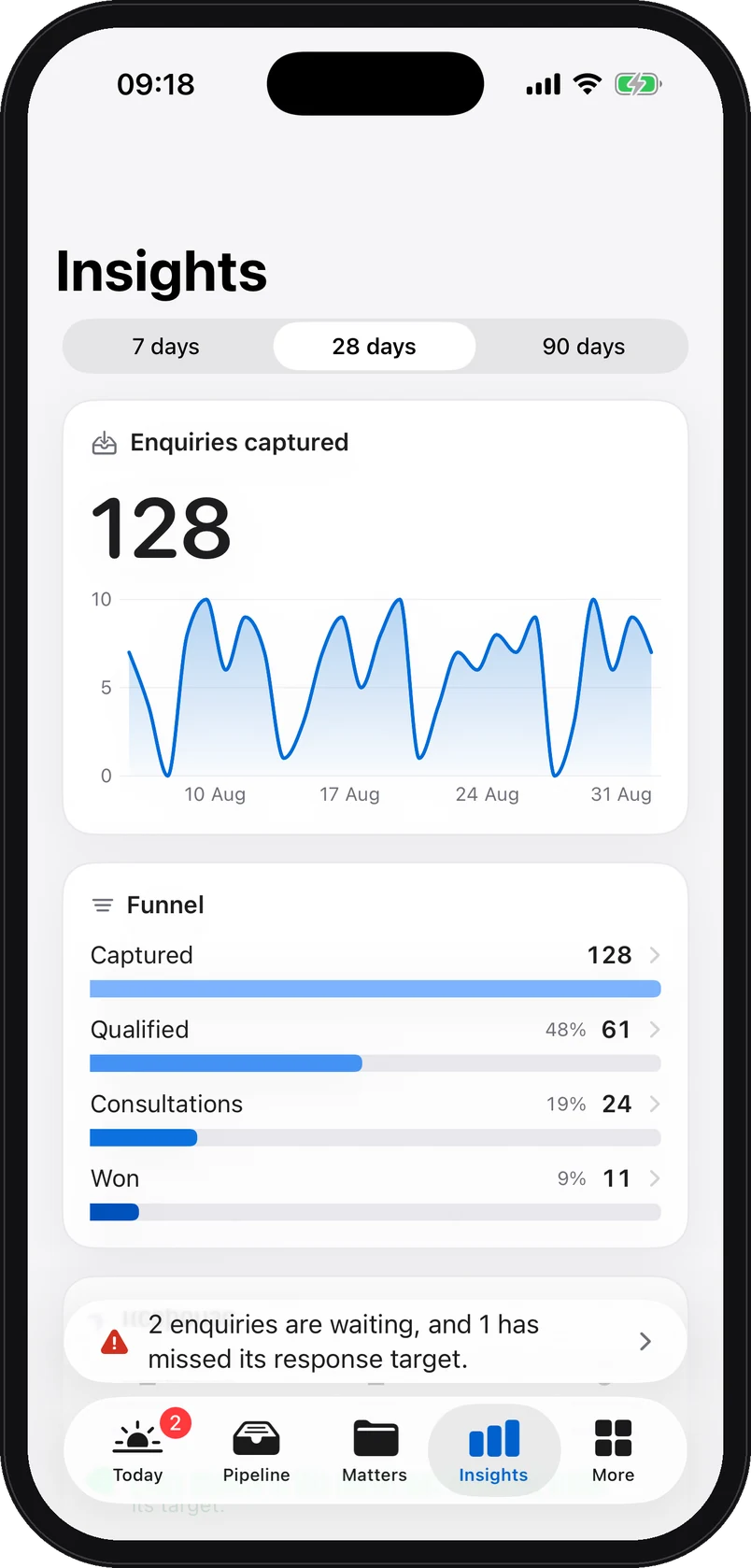
iPhone app screenshot with demo data: Insights on iPhone: enquiries captured over 28 days, the daily curve, and the funnel captured, qualified, consultations, won, on fictional data.
Intake channels

Connect your enquiry channels

Configure each channel from the platform, then add the link, embedded form or forwarding rule required for your setup.

  • Website form. A hosted enquiry page in your name, and a snippet to paste where the form should appear.
  • Email forwarding. One forwarding rule from your contact address, and every email becomes a triaged enquiry.
  • Missed calls and SMS. A capture line receives unanswered calls, the voicemail is transcribed, the enquiry is created.

Also in the settings: the Clio integration and an ICS calendar feed for your diaries.

Documents

Sealed before they even leave the browser

Documents are encrypted in the browser before transfer. The server opens them briefly in memory for inspection, then encrypts them again for storage.

  • Two key exchanges, X25519 and ML-KEM-1024, NIST’s post-quantum standard, applied in the browser before upload. Every download is re-sealed to a single-use browser key.
  • Content inspection on upload. Size bounded, type checked; scripts, macros and embedded programs refused.
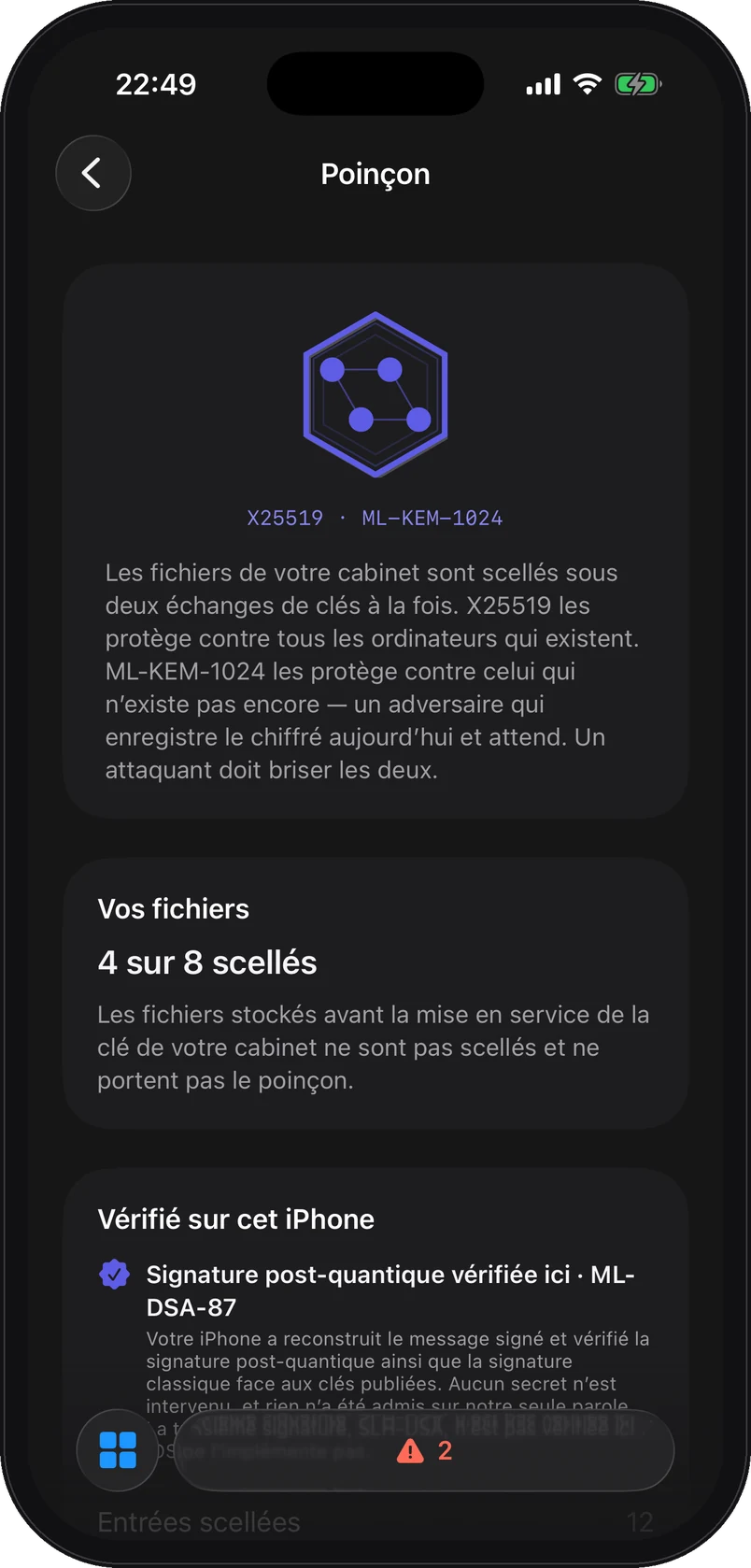
  • The Hallmark, on the iPhone. The app verifies the audit checkpoint signature on the device, ML-DSA-87, and shows the sealing status of documents.
iPhone app screenshot: the Hallmark screen shows document sealing and signature verification with demo data. Screen shown in French.
The Hallmark screen, shown here in French.
Security

Settings your firm administers

What protects professional confidentiality is visible in the app, without superlatives. What we do not do yet is written in the same place.

  • Two-step verification for every member, by one-time code, and required of the whole firm by its owners. Sessions can be revoked in one gesture.
  • Audit trail integrity. Sensitive actions are chained by SHA-256 hash, and the head of the chain is signed every day, with ML-DSA-87, SLH-DSA and Ed25519.
  • Document key and erasure. On erasure the key is destroyed; backups then expire according to their retention window.
  • Isolated per firm. Every client-data table carries a per-firm access rule, checked by automated tests on every change. Hosting on Supabase, in Ireland, and Vercel.

No SOC 2 report or ISO 27001 certification, and no external penetration test to date. The security architecture in detail.

iPhone app

The same information, in the partner’s pocket

What is waiting, first. Then the full enquiry brief, the matters, the insights and approval in one gesture. In light or dark.

iPhone app screenshot with demo data: Today screen: two enquiries waiting on the firm with their score and countdown, then the next seven days. The people are fictional.
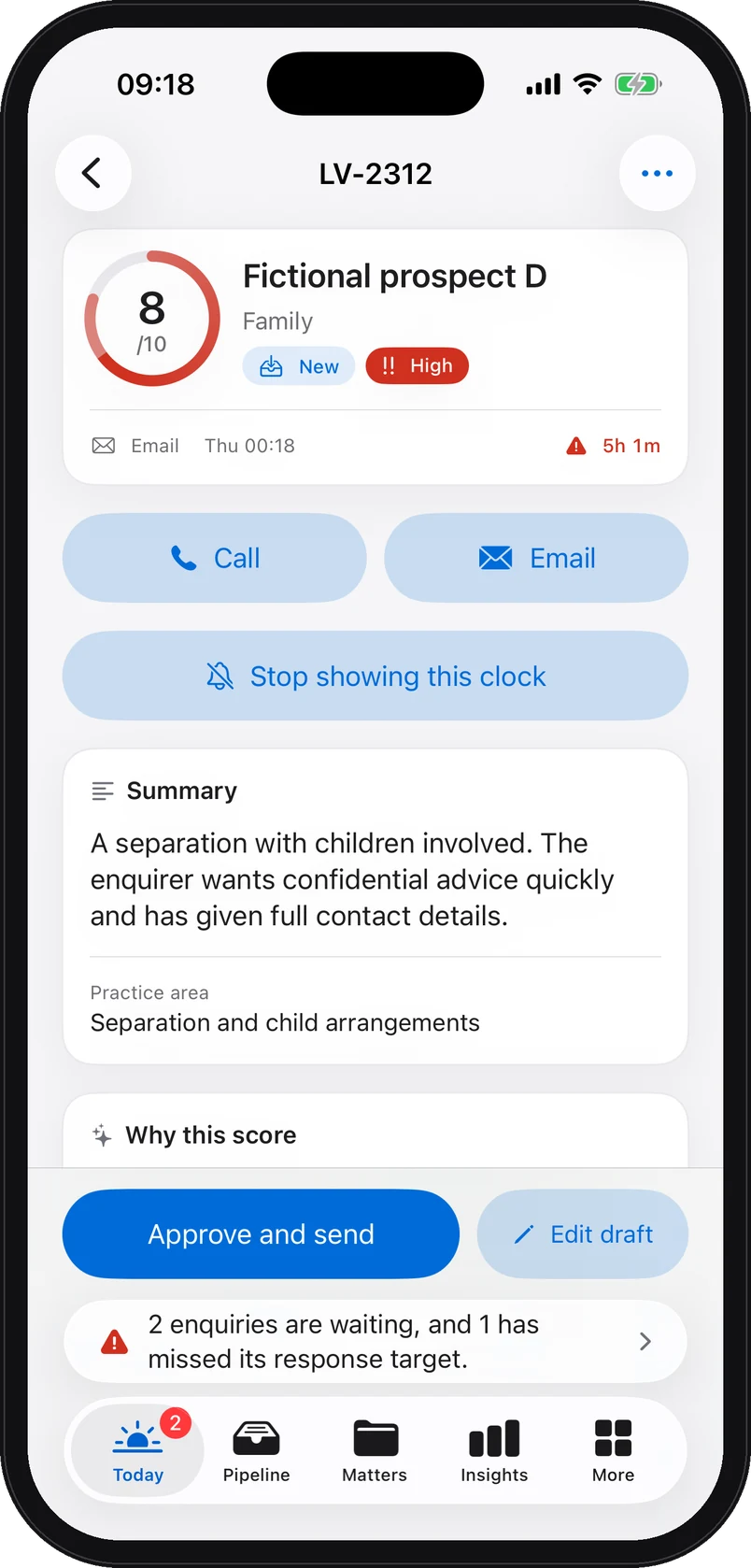
iPhone app screenshot with demo data: The enquiry brief on iPhone for a fictional enquiry: score 8 out of 10, practice area, high urgency, call or email, the lock-screen clock, summary, and the Approve and send, Edit draft buttons.
iPhone app screenshot with demo data: Insights on iPhone: enquiries captured over 28 days and the funnel captured, qualified, consultations, won, on fictional data.

The app’s main screens

Today, with what is waiting, the next seven days and the last 28. The “Pipeline” tab by stage, the matters, the insights, and under More: triage history, documents, client portal, know-how, Hallmark and settings.

The target, on the lock screen

An enquiry’s countdown appears as a Live Activity on the lock screen. Half an hour before the target, a reminder scheduled on the device warns you, without naming a client. Widgets and Siri shortcuts included.

Locked the moment you put it down

Face ID locks the app as soon as it goes to the background. The suggested reply stays a draft until “Approve and send”; “Edit draft” takes it back before anything is sent.

Web platform view and iPhone app screenshots. All demo data is fictional.

Where Lorne & Vale sits

The decisions your firm retains

Assess Lorne & Vale against your existing tools and the scope agreed for your pilot.

Practice management software

Practice management software can cover matters, time, billing and documents. Intake features vary by provider and plan.

A CRM

A CRM manages contacts and their progress. Some also offer forms, automation and intake features.

An answering service

An answering service handles calls under the service purchased. Hours, channels and the information provided vary by supplier.

A lawyer

No legal advice, no view on the merits, no client acceptance. The model summarises, scores and flags; a person at the firm decides.

Lorne & Vale

The firm’s intake layer: from first contact to the lawyer’s decision, on every channel, at every hour, with a record of each step.

The modules

The modules presented

These screens show the product’s proposed scope. Your offer specifies which modules are available, included or optional.

  • OverviewIndicators, high-qualification enquiries, what to handle first, the team’s workload.
  • EnquiriesEnquiry list and board, with stages, qualification levels, overdue replies and CSV export. Existing product labels may still use “Leads”.
  • MattersDeadlines, hearings, tasks, team, documents, client portal, history.
  • DocumentsSealed in the browser before upload, content inspected.
  • ClientsThe firm’s client records.
  • ReportsWeekly partner report, PDF in your branding, CSV.
  • KnowledgeThe firm’s knowledge base.
  • Intake channelsHosted form, email forwarding, missed calls and SMS.
  • IntegrationsClio.
  • Calendar feedsAn ICS feed for your diaries.
  • MembersThe whole team, with no per-user cost.
  • QuestionnairesThe firm’s questionnaires.
  • SecurityTwo-step verification, sessions, audit trail integrity, document key.

Optional modules exist, switched off by default. They are not part of the offer described here.

For firms of 1 to 20 lawyers

Setup adapted to your firm

Unlimited members

Members access the plan purchased without an individual seat charge. Pricing depends on the agreed firm-size band.

One flat subscription

A monthly fee for the whole firm, one practice area included, prices published. See pricing.

Live in 7 days

Channels connected, acknowledgement wording approved, team invited. Then a 60-day pilot, and month to month.

Founder-led

Setup and follow-up are handled by a founder, not by a call centre. Cancel any time, export any time.

Intake audit · 15 minutes

Review the workflow using a fictional enquiry

Fifteen minutes with a founder. Your channels, your volume, your practice area. You leave with a costed estimate and a clear answer, including if it is not for you.

Prefer to write first? contact@lornevale.com